
From course completion to a workstation that actually fits
An employee works mainly on spreadsheets at home, answers messages at the kitchen table and joins several video calls every day. A general ergonomics video reaches her, but it does not establish who will provide a missing monitor or review conflicting equipment settings. Workplace-specific instruction therefore needs three outcomes: the employee understands the adjustments relevant to her tasks, the employer decides which measures are necessary, and both subsequently check their effectiveness. This workflow is designed for employers in Germany and supplements general occupational safety instruction with a practical self-assessment and accountable follow-up for unresolved issues.
Do not begin by asking whether someone already holds a certificate. Ask about tasks, screen use, working locations and available equipment. Someone occasionally preparing for a journey needs a different conversation from a colleague who routinely analyses large datasets. Risk assessment under section 5 of the German Occupational Safety and Health Act remains the employer’s responsibility; a completed questionnaire does not replace it. Employees contribute observations, while responsible staff evaluate the information, decide on measures and resolve questions. The traffic-light categories and processing deadlines suggested here are organisational tools, not statutory forms or prescribed deadlines.
First establish the working arrangement and the trigger
Home office is initially an everyday label rather than a complete legal classification. Section 2(7) of the German Workplace Ordinance describes a telework workstation using criteria including a fixed workstation in the employee’s private premises, agreed working time and duration, and equipment provided and installed by the employer. Having a laptop at home does not automatically satisfy that definition. Record the actual arrangement and use before drawing conclusions from a calendar entry. HR and occupational safety specialists should review uncertain cases together. Where the definition is not met, general occupational safety responsibilities do not simply disappear.
For telework workstations, section 1(4) of the Workplace Ordinance limits its application: this covers the initial assessment under section 3, plus section 6 and Annex 6 where the workstation differs from the company workplace and the requirements apply given its particular nature. Check that scope specifically. Section 12 of the Occupational Safety and Health Act requires task-specific instruction during working time and identifies recruitment, changed duties and new equipment as triggers. Where section 6 of the Workplace Ordinance applies, it requires repetition at least annually. Do not present that interval without qualification as a universal rule for every mobile working arrangement.
A self-assessment that collects observations, not diagnoses
The worksheet starts with the date, task, working arrangement, typical duration of use and responsible contact. Five review areas follow: seating and desk, display and input devices, lighting and surroundings, changes of activity, and support for unresolved questions. For each area, the employee records a specific observation, an adjustment already tried and any remaining need. Practical response options include suitable, adjustment possible and support required. A blanket yes to “ergonomic workstation” provides little value because it reveals neither how the equipment is actually used nor what should happen next.
Keep the assessment focused on necessary information. A description of the workstation is often sufficient for the first review; private rooms do not need to be routinely shown on video or photographed in full. If a targeted picture would genuinely help, clarify its purpose, access and handling beforehand and offer an appropriate alternative. Health complaints do not belong in an action list visible to the whole team. Rules for handling personal data should be understandable for this internal process too. The assessment reviews working conditions; it neither diagnoses medical conditions nor provides individual treatment recommendations.
Review seating, desk and input devices together
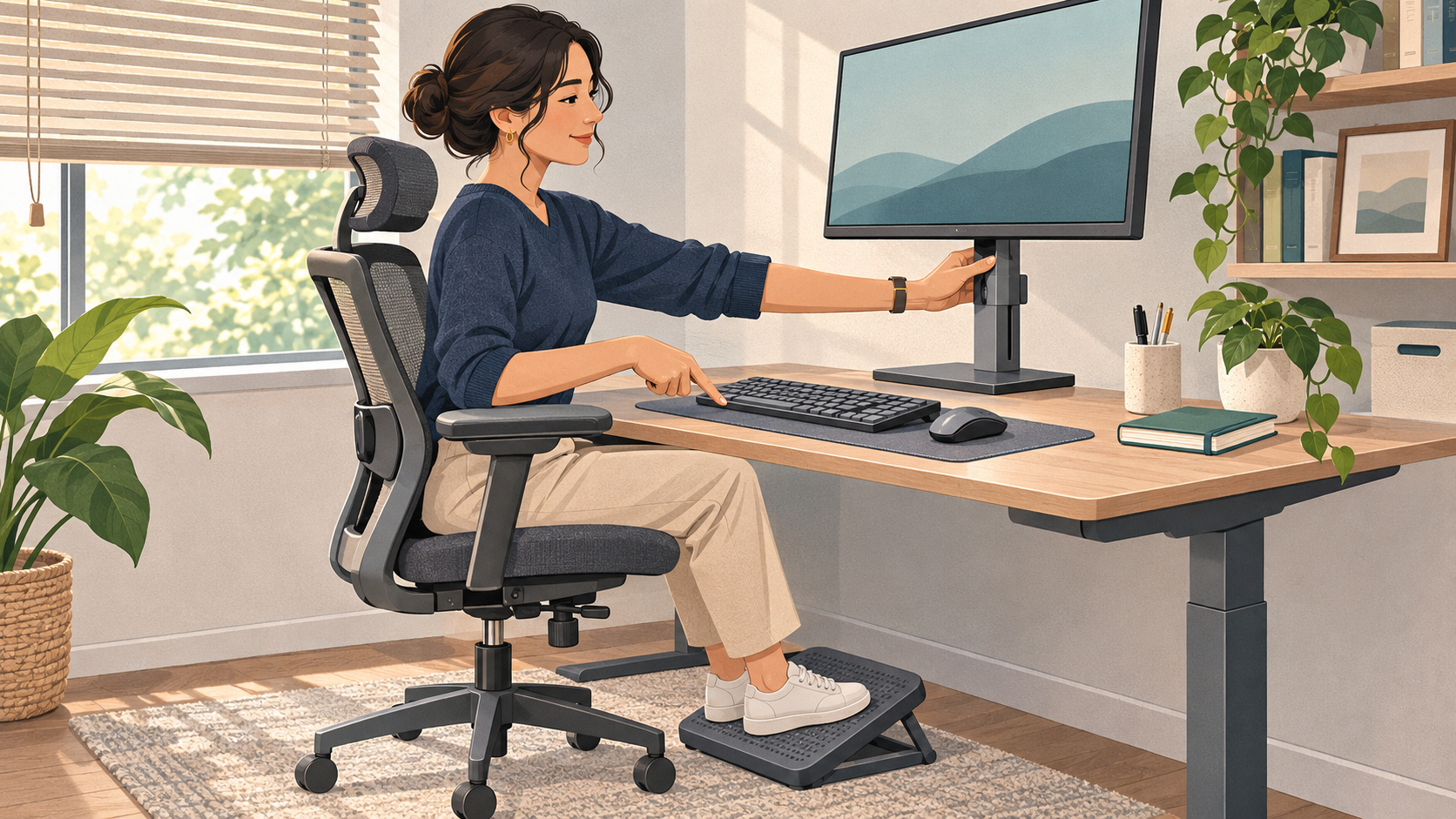
Ask employees to demonstrate or describe how they perform a typical task. Are their feet supported, shoulders relaxed and input devices reachable without sustained stretching? Is there room for the legs and for changes of posture? The sequence of adjustments matters more than a rigid ideal picture: review seating, align the work surface and input devices, then position the display. Raising a chair does not solve the problem if the person’s feet consequently lose support. Missing adjustment options should become an equipment issue for review rather than a criticism of the employee’s discipline.
Annex 6 of the Workplace Ordinance includes requirements concerning flexible equipment placement, space in front of the keyboard, movement and avoidance of glare. Use these as prompts for concrete observations, not remote diagnosis based on isolated angles. A common case is prolonged spreadsheet work solely on a laptop, where display and keyboard cannot be positioned independently. Review a task-appropriate combination of an additional display or secure positioning and separate input devices. Testing the combination together establishes whether it actually works with the available surface and the employee’s real workflow.
 AI-generated
Test lighting, readability and changes of activity
The next exercise uses a real but non-confidential work document. The employee adjusts text size and display settings, checks reflections and describes whether information remains readable without sustained leaning forward. Consider changing daylight: a usable workstation in the morning may suffer substantial glare in the afternoon. Test a different display position or available shading and record what helps. Instruction should never encourage anyone to ignore safe equipment placement, necessary clearances or existing connections simply to produce a tidy photograph. Ergonomics is about usable working conditions rather than an interior design competition.
Also plan how screen work can be interrupted by other activities or recovery periods. Annex 6 establishes that principle without prescribing one minute-by-minute formula for every task. A team scheduled into continuous video calls cannot delegate responsibility solely to individual employees. Managers need to review meeting schedules, availability expectations and allocation of work. For example, agree transition time between meetings and suitable changes of activity where the work allows them. Review the actual arrangement as a workplace measure. It replaces neither statutory rest breaks nor necessary changes to workload and organisation.
Turn each observation into an actionable assignment
Add fields for the observation, proposed measure, responsible role, agreed date and effectiveness check. Green means the reviewed item currently appears suitable; amber identifies an adjustment still requiring review; red means a responsible person must promptly decide how work can continue safely. These colours are not medical classifications. An equipment order remains open until the equipment is available, set up for use and checked. A deputy matrix with clear approval responsibilities prevents a manager’s absence from blocking every decision about replacement equipment or a suitable company workplace as an alternative.
Case one: a new colleague processes substantial spreadsheets at a small table three days a week. Enlarging the text is possible, but she then loses the overview and constantly switches views. “Take more breaks” is not a complete solution. The manager and relevant specialist review the task, available surface and suitable equipment, and procurement receives a specific assignment. An appropriate interim arrangement is agreed until implementation. At the follow-up, the decisive evidence is not a shipping confirmation but whether the colleague can actually perform her typical task using the new combination.
Provide clear routes for concerns and changes
Case two: an employee reports recurring discomfort despite adjusted display settings. The team does not collect diagnoses or discuss treatment in a group chat. The manager promptly reviews any work-related action needed and explains appropriate occupational health or medical support routes. Relevant specialists are involved according to the circumstances. Equipment, changes of activity and organisational conditions can be reviewed in parallel. Success does not mean promising that a course will cure discomfort; it means an appropriate response with clear responsibilities. Medical details remain outside the general training record.
Case three: the employee permanently changes rooms, receives a different display or takes on additional screen-based tasks. Do not simply treat the previous self-assessment as still valid. Check which conditions have changed and what supplementary instruction is needed. The overview of mandatory employee training helps position this work within the wider programme but does not replace assessment of the individual circumstances. Explain during the initial instruction how employees should report changes and who will respond. Otherwise, the organisation may reliably document a workstation that is no longer being used in the recorded way.
Record learning, questions and corrective measures separately
 AI-generated
Record who received which version of the instruction, how explanations related to the workstation, which questions were resolved and which measures remain open. Passing a knowledge test provides one part of the evidence, not confirmation of the entire workstation arrangement. Auditable training records should therefore remain distinguishable from the status of corrective measures. Someone may understand the instruction while still lacking necessary equipment. Conversely, delivery of a display does not prove its settings have been explained and tried. Keeping these records distinct reveals gaps without artificially treating learning progress and procurement as equivalent.
For a manageable start, select a small group with different screen-based tasks and test the process from invitation to effectiveness review. Check whether employees understand the questions, feedback reaches the right person and outstanding measures receive actual decisions. A streamlined rollout without spreadsheet chaos can structure assignments and reminders, but it should not merely create additional mandatory fields. Useful local measures include the proportion of unresolved responses and completed effectiveness reviews. These indicators are management aids, not statutory thresholds, and they do not establish anything about an individual employee’s health.
Use the digital learning component for the right purpose
The ConformBase course on ergonomics and screen work can establish shared understanding of workstation setup, posture, lighting and changes of activity. The live course description offers a story course and a micro-series; check language, content and suitability for the employees concerned when selecting it. Supplement the digital component with workplace-specific explanation, accessible questions and processing of the self-assessments. A course certificate is neither a medical assessment nor a guarantee of full legal compliance. Responsibility for suitable working conditions and necessary measures remains with the employer rather than transferring to the learning system.
By the end, everyone involved should be able to answer three questions: what can I usefully adjust at my workstation, where do I report an unresolved issue, and who checks the agreed improvement? Ask people to explain these answers through a realistic case rather than merely ticking a final box. The employer then gains a functioning feedback process instead of an apparently perfect snapshot. That is the practical value of workplace-specific instruction: learning is connected to actual working conditions, and identified problems have a traceable route from observation to a measure whose effectiveness has been checked.
ConformBase
Turn knowledge into training that works.
Bring compliance, privacy and security awareness into a format your people want to complete, with certificates and audit-ready evidence.
Start free trialAsk about custom courses →